
Drop WebM file here or click to select
Supports .webm video files
Output format: MP4 (H.264 + AAC)
Max file size: 500MB
Multiple Formats
Supports MP4/WEBM/MKV/AVI and more
No Installation
Powered by FFmpeg.wasm, runs in browser
Full Quality Control
Customize CRF, resolution, codec parameters
Supported formats and compatibility details
Focused conversion from WebM input to MP4 output for practical playback and delivery workflows.
Input: WebM
This page accepts .webm files and is tuned for WebM source conversion with clear validation.
Output: MP4
Output is .mp4 video to maximize compatibility with media players, mobile devices, and upload platforms.
H.264 + AAC for Compatibility
The converter uses mainstream codec settings that are widely supported by modern and older playback systems.
No Software Installation
Convert directly in your browser without desktop tools or plugins.
Local Privacy First
Files are processed locally instead of being sent to remote conversion queues.
Practical for Daily Work
Useful for social publishing, team handoff, client delivery, and playback troubleshooting.
Why convert WebM to MP4
WebM is efficient for web delivery, but MP4 is still the safer default for broad playback compatibility. Converting WebM to MP4 helps when you need reliable playback on older devices, embedded players, business software, or upload pipelines that reject WebM.
- Broader Device SupportMP4 works across most phones, smart TVs, office tools, messaging apps, and hardware players where WebM playback may fail.
- Easier File SharingMany teams and clients ask for MP4 as a default handoff format, especially for presentations, ads, and learning content.
- No Upload RequiredEverything runs in your browser with local processing, so private or internal footage stays on your device.
When WebM to MP4 conversion helps most
Converting to MP4 is usually about compatibility and predictable playback, not cosmetic changes. These are common scenarios where MP4 is the safer format.

How to convert WebM to MP4
A six-step workflow for compatibility-focused conversion.
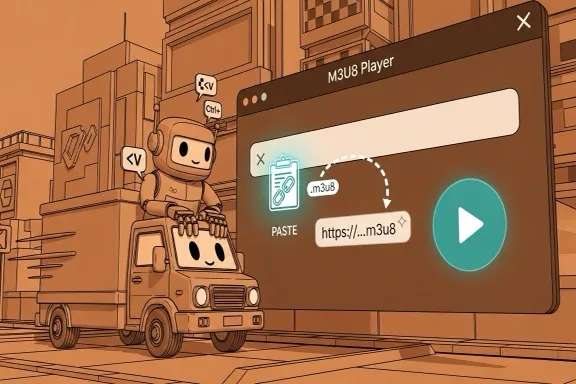
Step 1 - Open this converter
Stay on this page and use the converter panel above. Everything runs in your browser with no install.
Step 2 - Add your WebM file
Drag and drop a local .webm file or click to browse and select one from your device.
Step 3 - Validate input format
The tool checks for WebM input and warns if the file type does not match this page's converter scope.
Step 4 - Start conversion
Click the conversion button to transcode WebM into MP4 with compatibility-friendly settings.
Step 5 - Download MP4 output
After conversion, the MP4 file downloads automatically and keeps your original filename base with a .mp4 extension.
Step 6 - Verify playback and share
Test the MP4 file on your target player or platform, then send it to teammates, clients, or publishing tools.
Built for compatibility-focused conversion
Simple browser-side processing for WebM to MP4 workflows.
Monthly Converter Sessions
20K+
Across device compatibility workflows
Typical Success Rate
>96%
For standard WebM source files
Average Conversion Time
<45s
On common desktop hardware
What users say
Feedback from teams converting WebM for wider playback support.
Elena Rossi
Content Operations Lead
We receive WebM exports from web tools, but client systems still request MP4. This page gives us a quick browser conversion without extra desktop software.
Daniel Kim
Product Marketer
Some ad upload portals reject WebM files. Converting to MP4 here solves format issues fast and keeps campaign reviews moving.
Sofia Marin
E-learning Producer
Our LMS is strict about MP4 playback. Converting WebM lectures in-browser is simpler than asking every instructor to install a full editor.
WebM to MP4 FAQ
Why convert WebM to MP4 instead of keeping WebM?
WebM is great for web delivery, but MP4 is still accepted by more players, devices, and upload systems. If playback compatibility is your priority, MP4 is usually the safer output format.
Does converting WebM to MP4 reduce file size?
Not always. File size depends on source complexity and encoding settings. The main goal on this page is broad playback compatibility, not guaranteed size reduction.
Will the output MP4 play on older devices?
In most cases yes, because the converter outputs MP4 with mainstream codec settings designed for broad support. Very old devices can still vary, so test on your target environment when needed.
Are my files uploaded during conversion?
No. The conversion runs locally in your browser using FFmpeg.wasm, so your source video is not uploaded to a remote server.
Can I convert large WebM files here?
Yes, but browser performance depends on your device memory and CPU. For best stability, keep files within practical limits and close heavy browser tabs during conversion.
What related tools should I use for adjacent tasks?
Use MOV to MP4 for QuickTime files, MKV to MP4 for Matroska sources, and MP4 Converter for broader MP4 conversion workflows across multiple input formats.
Convert WebM to MP4 now
Start with the converter above, or open related MP4 tools for adjacent source formats and workflows.