
The Complete Guide to HLS Video Streaming Protocol: Principles, Advantages, and Practice (2026 Edition)
Have you ever wondered what technology is quietly supporting you whether you are watching high-definition movies on your phone during your subway commute, or watching smooth live sports events with a global audience at home? The answer is likely HLS. HLS (HTTP Live Streaming) is a powerful video streaming protocol introduced by Apple.
Have you ever wondered what technology is quietly supporting you whether you are watching high-definition movies on your phone during your subway commute, or watching smooth live sports events with a global audience at home? The answer is likely HLS. HLS (HTTP Live Streaming) is a powerful video streaming protocol introduced by Apple. It has become the absolute backbone of modern internet video transmission, supporting countless applications we use daily, from Netflix and YouTube to TikTok and Bilibili.
This article will provide a comprehensive analysis of how HLS works, from core concepts to practical applications, allowing you to understand this key technology that has changed the way we watch videos in one go.
Table of Contents
- The Complete Guide to HLS Video Streaming Protocol: Principles, Advantages, and Practice (2026 Edition)
- Table of Contents
- How HLS Works: A Simple Metaphor
- The Three Core Components of HLS
- A Complete Playback Journey: HLS Client Workflow
- Pros and Cons of HLS: Why Does It Dominate?
- Real-World Applications of HLS
- Future Outlook: Faster and Stronger Low-Latency HLS
- Frequently Asked Questions (FAQ)
- Conclusion
How HLS Works: A Simple Metaphor
 HLS is like a smart sushi chef who slices a whole tuna into exquisite pieces of sushi.
To understand HLS, let’s first forget complex technical terms.
Imagine you are at a high-end sushi restaurant. Traditional video downloading methods are like the restaurant requiring you to wait for a whole giant tuna (the complete video file) to be caught from the sea, processed, and transported to you before you can start enjoying it. This process is not only long, but if something goes wrong during transportation, you get nothing to eat.
HLS, on the other hand, acts like a smart sushi chef. He will:
-
Segmentation: Slice the whole tuna (video) in advance into exquisite sushi pieces of moderate size (small video segments, usually a few seconds long).
-
Create Playlist: Provide you with a detailed menu (
.m3u8index file) that lists the tasting order of all the sushi. -
HTTP Delivery: You just need to order according to the menu, and the waiter (HTTP protocol) will serve you one piece of sushi at a time. As soon as you finish one piece, the next one comes.
In this way, you can start enjoying almost without waiting, and you can adjust the speed of eating at any time according to your appetite (network speed), making the entire dining experience (viewing experience) smooth and pleasant.
The Three Core Components of HLS
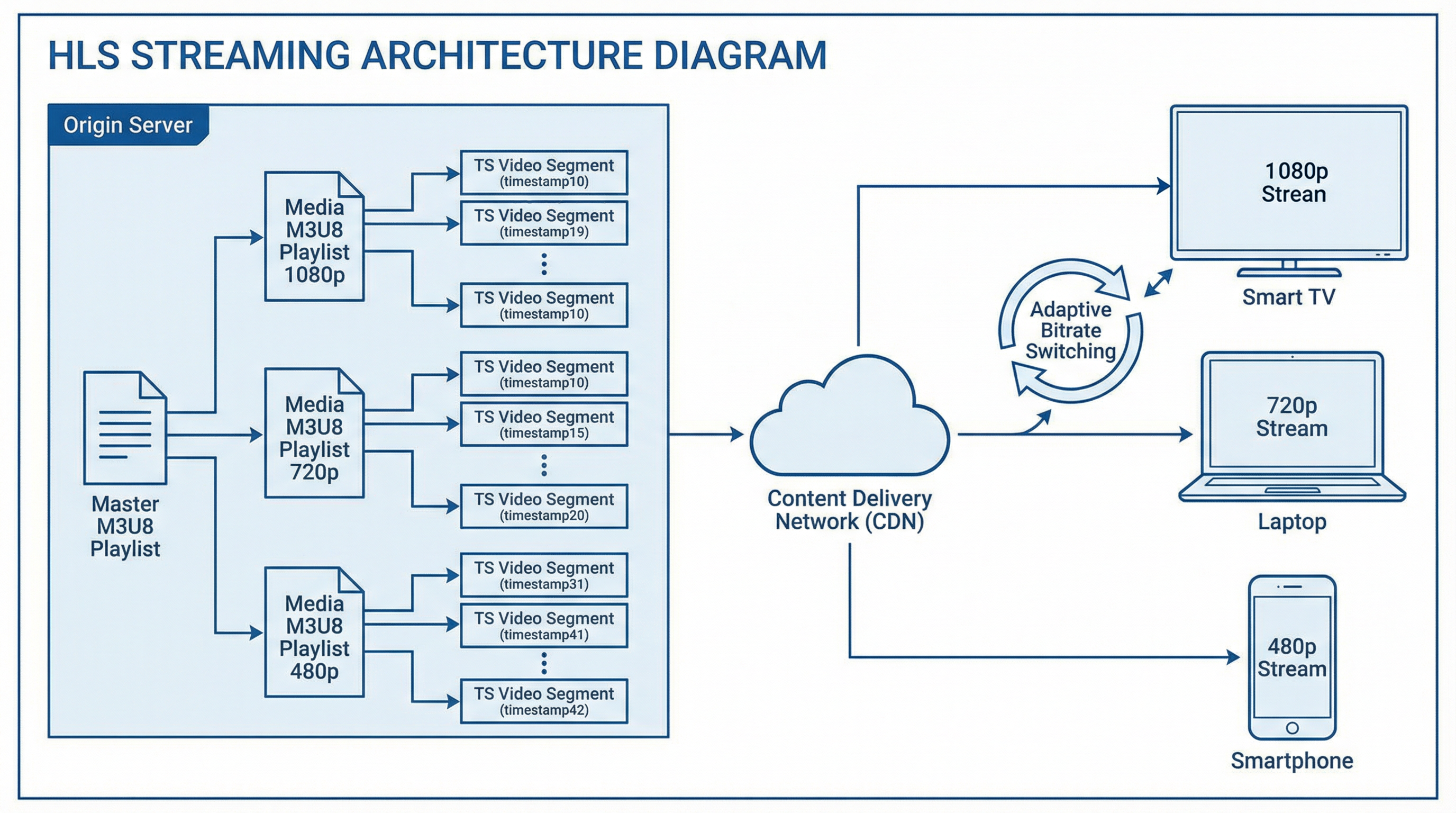 HLS Architecture: M3U8 Index File, TS/fMP4 Media Segments, and Adaptive Bitrate (ABR) working together
Now, let’s take a deeper look at the three key roles in the HLS “sushi restaurant”.
”Playlist”: M3U8 Index File
The M3U8 file is the brain and navigation map of HLS. It is essentially a plain text file whose function is to tell the player: which fragments the video is divided into, where these fragments are, and in what order they should be played.
An .m3u8 file can be:
-
Master Playlist: Like a “set menu”, it does not directly list specific video segments, but provides options for different “flavors” (such as 1080p HD, 720p SD, 480p smooth), each pointing to a separate media playlist.
-
Media Playlist: This is the list of “specific dishes”, detailing the URL, duration, and other information of each video segment (such as
segment0.ts,segment1.ts…).
Here is a simplified example of a media playlist:
#EXTM3U
#EXT-X-TARGETDURATION:10
#EXT-X-VERSION:3
#EXTINF:9.5,
segment0.ts
#EXTINF:10.0,
segment1.ts
#EXTINF:8.9,
segment2.ts
#EXT-X-ENDLIST-
#EXT-X-TARGETDURATION: Defines the maximum duration of a segment (here it is 10 seconds). -
#EXTINF: Describes the specific duration of the segment immediately following it. -
#EXT-X-ENDLIST: Indicates the end of the video (used only for VOD). For live streaming, there is no such tag, and the list is constantly updated.
”Video Segments”: TS/fMP4 Media Fragments
The core operation of HLS is to slice a complete media stream into a series of small, independently playable media segments. The duration of each segment is usually between 2 and 10 seconds.
The most common segment format is MPEG-2 TS (.ts). The TS format has a long history and good fault tolerance, making it very suitable for streaming. In recent years, in order to better support modern coding formats such as H.265 (HEVC) and improve efficiency, HLS has also begun to widely support Fragmented MP4 (fMP4), whose file extension is usually .m4s.
This slicing mechanism brings several core advantages:
-
Instant Playback: The player only needs to download the first segment to start playing without waiting for the entire file to download, greatly reducing startup latency.
-
Seamless Switching: Makes adaptive bitrate switching possible, allowing the player to switch smoothly to streams of different definitions at segment boundaries.
-
Embrace HTTP: Each segment is an independent static file that can be hosted by any standard HTTP server and can easily utilize CDN for global distribution and caching, reducing pressure on the origin server.
”Smart Speed Control”: Adaptive Bitrate (ABR)
Adaptive Bitrate (ABR) is one of the most fascinating features of HLS. It allows the player to automatically and seamlessly switch between video streams of different bitrates (definitions) based on the user’s real-time network conditions.
How is this process implemented?
-
The server side prepares multiple video streams of different definitions (such as 1080p, 720p, 480p) and slices them separately.
-
The Master Playlist (Master M3U8) will contain the entry addresses of all these streams of different definitions.
-
The player first obtains the master list, and then, like a smart traffic dispatcher, continuously monitors the current network “road conditions” (download speed, buffer size).
-
If the network is smooth, it will choose the high-definition route (1080p) to let you enjoy the best picture quality.
-
If the network starts to get congested, it will immediately switch to the smooth route (480p), sacrificing some picture quality to ensure that the video does not buffer.
-
All this happens automatically in the background, with the user being almost unaware, thus obtaining a smooth viewing experience in various network environments.
A Complete Playback Journey: HLS Client Workflow
Now, let’s follow the player’s perspective and go through a complete HLS playback process.
-
Get “Menu” (M3U8): The player first requests the master
.m3u8file via a URL. -
Select “Flavor” (Stream Selection): The player parses the master list, selects an appropriate bitrate stream based on current network conditions and device performance, and requests the corresponding media
.m3u8file. -
Download First “Sushi” (Download Segment): The player gets the URL of the first segment from the media list and downloads it.
-
Play & Buffer: Once the first segment is downloaded enough to play, the video begins to play. At the same time, the player will continue to download subsequent segments in order and put them into the buffer for rainy days.
-
Smart Scheduling (ABR Switching): During playback, the player continuously monitors the network. If the network speed changes, it will seamlessly switch to a stream of a more suitable bitrate at the next segment boundary.
-
Handle Live Streaming: If it is a live stream, the media list is dynamically updated. The player will periodically re-request the
.m3u8file to get the latest generated segment information and discard old segments, constantly moving forward like a sliding window. -
End of Stream: For VOD, when the player downloads and plays all segments before the
#EXT-X-ENDLISTtag, playback ends. For live streaming, the server will also add this tag to the m3u8 when the stream ends.
Pros and Cons of HLS: Why Does It Dominate?
HLS is not perfect, but its huge advantages make it the first choice in most scenarios.
Unparalleled Advantages
-
👑 Excellent Compatibility: HLS is supported by almost all devices—iOS, Android, Windows, Mac, as well as various smart TVs and browsers. Especially with native support from the Apple ecosystem, it has become the “lingua franca” of the mobile end.
-
🚀 Easy Firewall Traversal: HLS uses standard HTTP/80 and HTTPS/443 ports to transmit data, just like browsing web pages. This means it can easily pass through most corporate or home firewalls, while protocols like RTMP may be blocked.
-
🌍 CDN Friendly: The fragmented file structure is naturally suitable for CDN caching and distribution. Segments of popular videos can be cached at edge nodes closest to the user, achieving global low-latency, high-concurrency access.
-
🤖 Intelligent Adaptive Bitrate: The built-in ABR mechanism provides users with an “always-on” smooth experience, which is a core requirement of modern video services.
-
🔧 Simple Deployment: You don’t need expensive dedicated streaming servers; any standard Web server (such as Nginx, Apache) can host HLS content.
Limitations Not to Be Ignored
-
🐢 Higher Live Latency: This is the most famous drawback of HLS. Due to the segmentation mechanism and client buffering strategy (usually requiring buffering 2-3 segments before playing), the live latency of traditional HLS is usually 10-30 seconds or even higher. This is fatal for scenarios requiring strong real-time interaction (such as online education, video conferencing, sports betting).
-
⚙️ Segmentation Overhead: Slicing video into thousands of small files brings extra HTTP request overhead. Although HTTP/1.1 Keep-Alive and HTTP/2 alleviate this problem to some extent, overly small segments may still affect transmission efficiency.
⚠️ Note: The high latency problem of HLS is not unsolvable. The Low-Latency HLS (LL-HLS) introduced below is born to solve this pain point.
Real-World Applications of HLS
-
Video on Demand (VOD): Almost all video websites, such as Netflix, Tencent Video, iQIYI, use HLS or similar technologies. When you drag the progress bar or switch definitions, HLS is working silently behind the scenes.
-
Live Video Streaming: Large live streaming platforms like Twitch, Douyu, Huya, although they may use a mix of protocols, HLS is the basic protocol covering the widest audience (especially mobile and Web ends). Even with latency, it is sufficient for weak interaction scenarios like bullet screen chat.
-
Online Education: For recorded courses, HLS is the perfect choice. For live classes requiring low-latency interaction, platforms may adopt technologies like WebRTC, but provide HLS streams as a backup or for playback.
Future Outlook: Faster and Stronger Low-Latency HLS
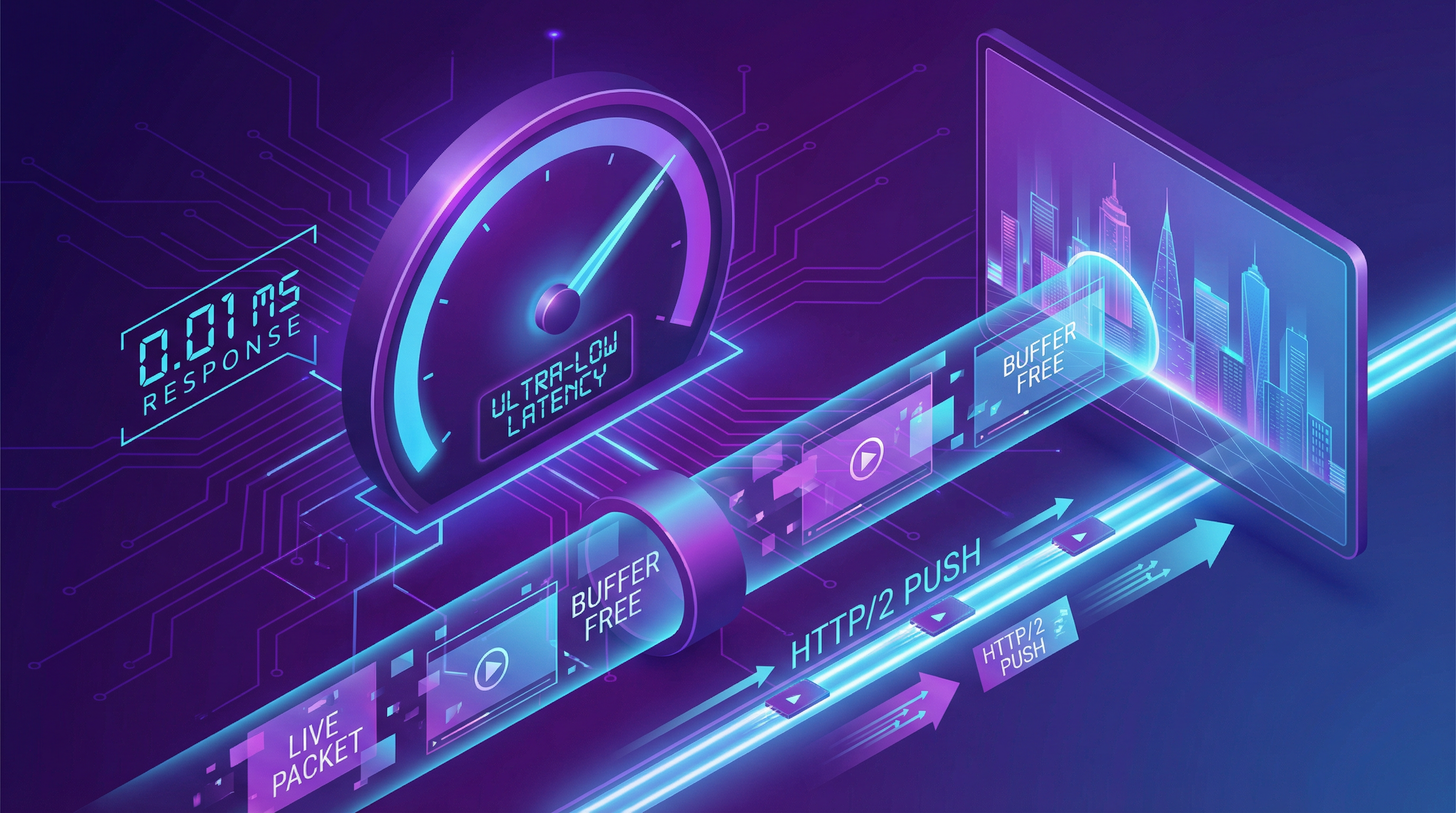 LL-HLS reduces latency to 2-5 seconds through partial segments and incremental updates
To solve the high latency problem of traditional HLS, Apple introduced the Low-Latency HLS (LL-HLS) extension specification in 2019.
LL-HLS “jumps the gun” by introducing several key technologies:
-
Partial Segments: Allows the player to start downloading a small part of a segment before the entire segment is fully generated.
-
Playlist Delta Updates: Only sends the newly added parts in m3u8, reducing update overhead.
-
Blocking Requests & HTTP/2 PUSH: The server can more proactively push new segments to the client.
Through these optimizations, the goal of LL-HLS is to reduce end-to-end latency to the broadcast level of 2-5 seconds, making it competitive in more real-time interactive scenarios.
Frequently Asked Questions (FAQ)
Q1: What is the difference between HLS and MPEG-DASH?
A: Both are HTTP-based adaptive streaming protocols with similar principles. The main difference is that HLS is led by Apple, while MPEG-DASH is a standard of the International Organization for Standardization (ISO). HLS has native advantages in the Apple ecosystem, while DASH is more flexible and feature-rich in some aspects. Currently, the two are the main competitors in the market.
Q2: Why does HLS live streaming have latency? How to optimize?
A: Latency mainly comes from three parts: server-side encoding and slicing time, distribution network latency, and client buffering strategy. Optimization methods include: shortening segment duration (e.g., from 10 seconds to 2 seconds), reducing player startup buffer, and adopting LL-HLS technology.
Q3: How do I protect my HLS videos from hotlinking or downloading?
A: HLS provides a variety of security mechanisms. The most commonly used is AES-128 encryption, where a key URL can be specified in the m3u8, and the player must obtain the key to decrypt the segments. In addition, it can be combined with Token Authentication (Anti-hotlinking), adding time-sensitive signatures to the URLs of M3U8 and TS files to prevent links from being distributed at will.
Q4: Do all browsers support HLS directly?
A: No. Currently, only Safari browser supports HLS natively. On browsers like Chrome and Firefox, JavaScript libraries (such as hls.js) are needed to parse m3u8 and play via the Media Source Extensions (MSE) API. However, such libraries are very mature and convenient for developers to use.
Conclusion
Starting from a simple concept of slicing and indexing, HLS cleverly utilizes the ubiquitous HTTP protocol to build a powerful, compatible, and scalable video distribution empire. It not only solves many pain points of traditional streaming media but also greatly improves the viewing experience of global users through adaptive bitrate technology.
Despite limitations such as latency, with its unparalleled ecosystem advantages and continuous technical evolution (such as LL-HLS), HLS will remain the king of video streaming transmission in the foreseeable future. Understanding HLS is understanding the pulse of modern internet video.