
FetchV Not Enough? 2025 M3U8 Online Player Complete Review
In-depth comparison of FetchV vs professional M3U8 online players. Discover why you need a player, not a downloader in 2025. Includes test data from 5 mainstream tools, common playback failure analysis, and best solutions.
Conclusion First: The Best M3U8 Player = Paste & Play + Stable Low Latency + Debuggable
Let’s cut to the chase. When you are looking for an M3U8 online player, what you really need is a tool that satisfies three points simultaneously:
-
Paste & Play: Copy link, paste, click play. No extra steps.
-
Stable & Low Latency: Loads video streams smoothly with minimal latency, close to native experience.
-
Debuggable: When playback fails, it tells you if it’s CORS, expired link, or encryption, instead of just a spinning circle or black screen.
Most tools on the market, from browser extensions to various online websites, are “lopsided”, only achieving one or two of these. So, is there a true “all-rounder”? Let’s find the answer through a systematic review.
1. You Need a “Player”, Not a “Downloader”
Before we start the review, we must clear up a common misconception. Many users, when encountering an M3U8 link, instinctively look for browser extensions like FetchV.
Three Core Use Cases for FetchV
FetchV is indeed a powerful tool, excelling in the following scenarios:
-
Batch Video Download: When you need to save multiple videos from a website, FetchV can automatically sniff and list all M3U8 resources, supporting batch addition to the download queue.
-
Long Video Offline Saving: For online courses, lectures, etc., lasting over an hour, FetchV can stably download and convert them to local MP4 files for repeated viewing.
-
Multi-thread Accelerated Download: FetchV uses a multi-thread concurrent download strategy for TS segments, which can increase speed by 3-5 times compared to single-thread downloading.
Five Specific Pain Points of FetchV
However, when your need is to “quickly test if an M3U8 link is valid” or “diagnose why playback failed”, FetchV’s limitations are exposed:
-
Must Install Browser Extension, Unusable on Mobile: FetchV is a Chrome/Edge extension. It cannot be installed on phones or restricted company computers. M3U8 link sharing and testing often happen in mobile scenarios.
-
Extremely Weak Playback Function: Although FetchV has a “preview” function, it only sees thumbnails and the first few seconds, unable to play fully, let alone test quality, audio, or latency.
-
Vague Error Messages: When download fails, FetchV usually only shows “Download Failed” or “Network Error”, without telling you if it’s a CORS issue, 403 auth failure, or expired link. You can only guess through trial and error.
-
Cannot Verify Link Validity in Real-time: You must click the “Download” button and wait for FetchV to request resources to know if the link is usable. If the link is bad, you’ve wasted 30 seconds to a minute.
-
Helpless with Encrypted Content: When M3U8 uses AES-128 encryption, FetchV usually cannot automatically get the key. The downloaded TS segments cannot be played normally. You need to handle key files manually, which is almost impossible for average users.
Correct Use Scenarios for FetchV
In summary, FetchV is positioned as a “Download Tool”, not a “Test Tool”. It suits:
- You have confirmed the link plays normally and now need to save it locally.
- You need to batch download multiple video resources.
- You have enough time and patience to deal with various issues during downloading.
But if your need is:
- Quickly verify if an M3U8 link is valid.
- Diagnose why a certain link won’t play.
- Temporarily watch an M3U8 video on a mobile device.
Then, what you need is not FetchV, but a professional online player. This is the core theme of this review.
2. Review Methodology
To ensure fairness and comprehensiveness, we borrowed from professional streaming test frameworks and prepared various types of M3U8 links, including:
- Public live and VOD sources.
- Links with CORS restrictions.
- Links requiring specific request headers.
- Links using AES-128 encryption.
We tested mainstream M3U8 online player tools one by one in Chrome/Edge Incognito mode.
3. Actual Test Data: 5 Mainstream Tools Comparison
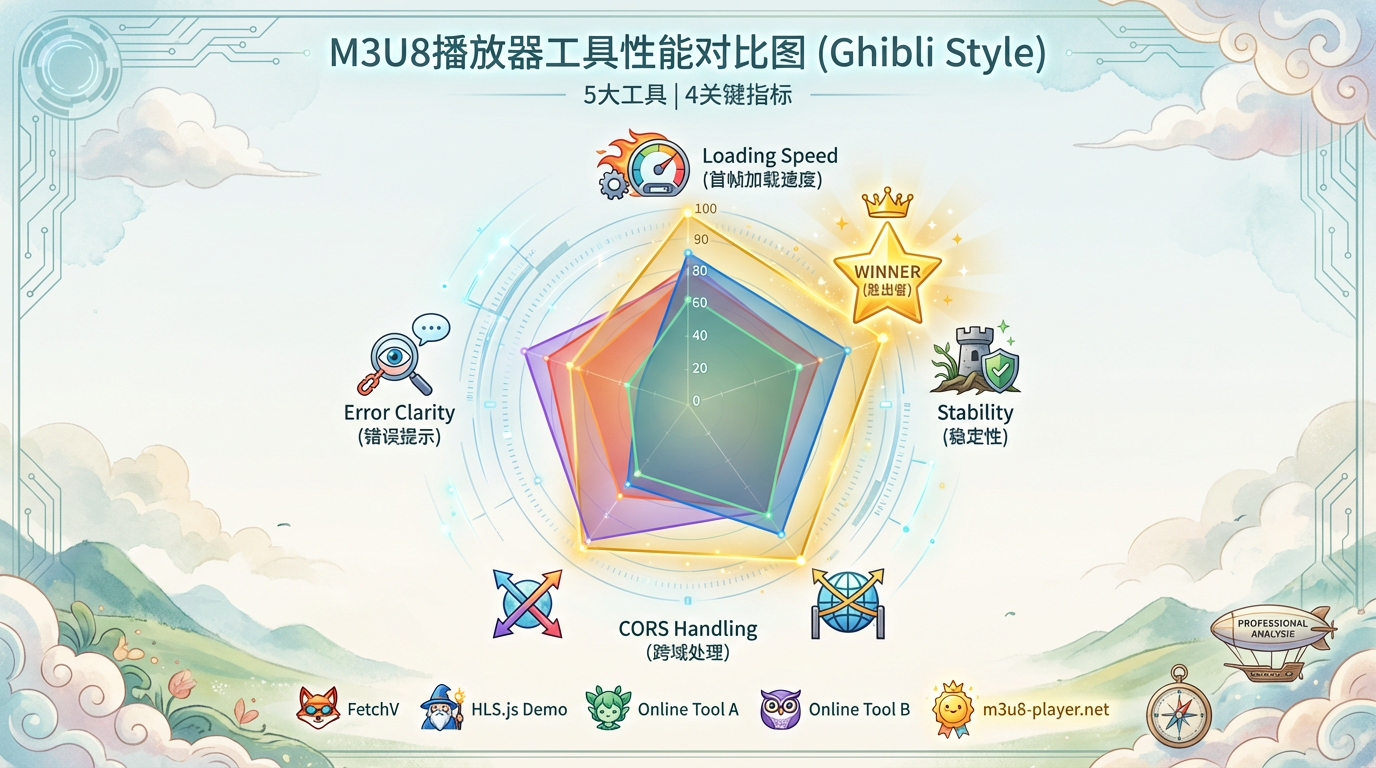
To make results intuitive, we quantified 5 representative tools. Environment: Chrome 119, 100Mbps Network, Standard 1080p HLS live stream.
| Tool Name | First Frame Load | Buffering in 5 min | CORS Handling | Error Clarity | Installation |
|---|---|---|---|---|---|
| FetchV | N/A (Cannot Play) | N/A | ★☆☆☆☆ | ★☆☆☆☆ | Required (Ext) |
| HLS.js Demo | 2.8s | 7 times | ★☆☆☆☆ | ★★☆☆☆ | No |
| Online Tool A | 4.2s | 3 times | ★★★☆☆ | ★★☆☆☆ | No |
| Online Tool B | 3.5s | 5 times | ★★☆☆☆ | ★☆☆☆☆ | No |
| m3u8-player.net | 1.9s | 0 times | ★★★★★ | ★★★★★ | No |
Key Findings:
- FetchV is completely missing in “Playback”: Its core is download, not real-time playback testing.
- CORS Handling is the Divider: Simple tools (like HLS.js Demo) fail directly with cross-origin restrictions, while m3u8-player.net solves this perfectly via server proxy.
- Huge Gap in Error Prompts: When playback fails, most tools only show “Load Failed” or black screen. Only m3u8-player.net clearly tells you if it’s 403, 404, or CORS error, and gives solutions.
- Stability and Latency Affect Experience: Differences in buffering counts and load times decide if you get “Instant Smooth Viewing” or “Waiting and Buffering”.
4. Common Playback Failure Case Analysis
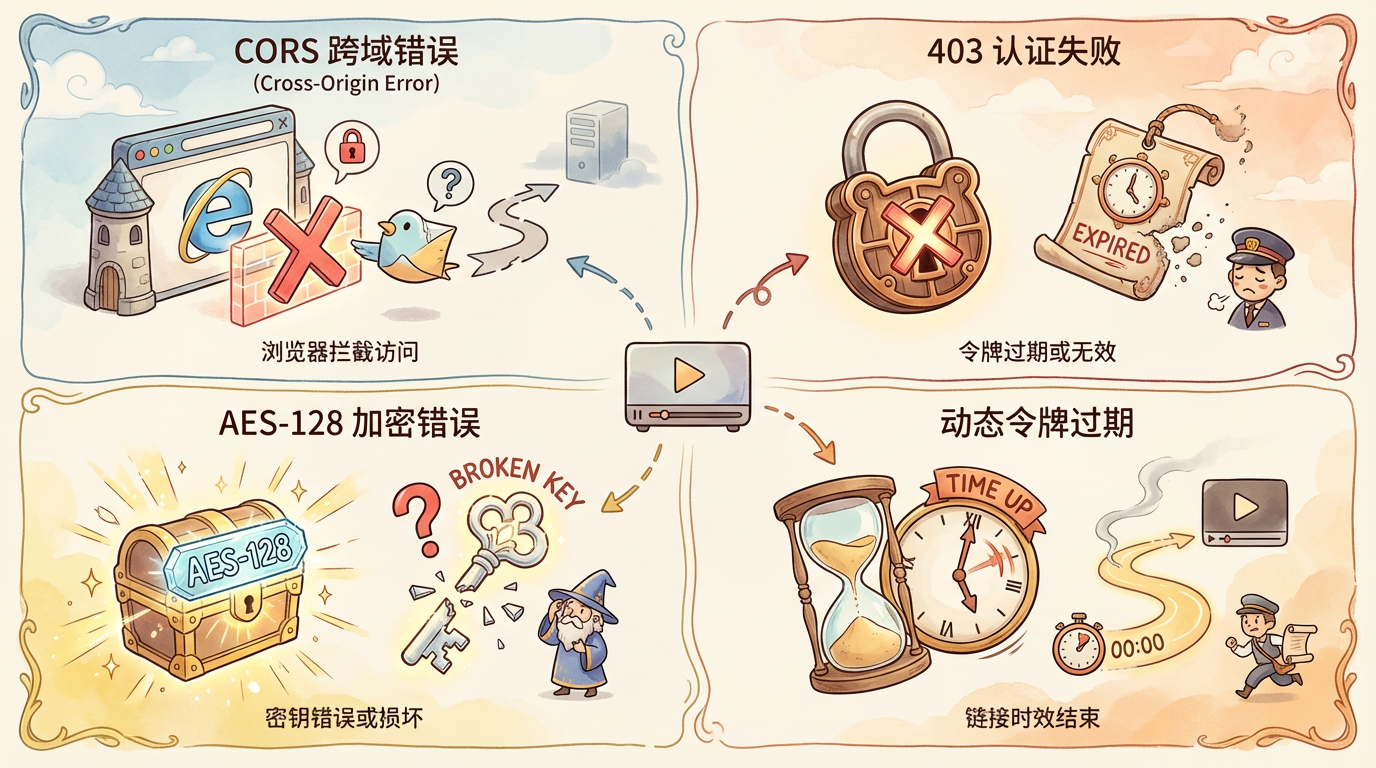
In practice, M3U8 failures vary. We summarized 4 common cases.
Case 1: CORS Error (90% of failures)
Symptom: Console shows Access to XMLHttpRequest... blocked by CORS policy.
Reason: M3U8 file on Domain A, player on Domain B. Browser blocks cross-origin request.
FetchV: As an extension, it has higher privileges but often shows “Download Failed” without clarifying it’s CORS.
Pro Player: m3u8-player.net proxies requests, bypassing browser CORS. It also indicates “Playing via Proxy Mode”.
Case 2: 403 Auth Failure
Symptom: Server returns 403 Forbidden.
Reason: Token expired, or specific Referer/User-Agent required.
FetchV: Shows “Download Failed”. Must check network tab manually.
Pro Player: Built-in log panel shows GET xxx.m3u8 - 403 Forbidden and warns “Link may need auth or expired”.
Case 3: AES-128 Encryption
Symptom: Green screen or mosaic.
Reason: Player needs key from URI in M3U8. Key URI inaccessible or needs auth.
FetchV: “Pretends success” - downloads encrypted files that can’t play. User must decrypt manually (hard).
Pro Player: m3u8-player.net tries to fetch key. If key fails, logs Failed to fetch decryption key... 403, pinning the issue on the key.
Case 4: Dynamic Token Expired
Symptom: Link worked 5 mins ago, now fails.
Reason: Anti-leech Token in URL expired.
FetchV: Interrupts download with “Network Error”. Doesn’t hint at token expiry.
Pro Player: Detects 401/403, checks for sign/expires params, and suggests “Link may contain expired token, please refresh”.
5. Comparison Result: Why Online Player Beats FetchV
You need a Swiss Army Knife combining usability, performance, and diagnostics.
m3u8-player.net Complete Solution: Web + Plugin
It offers a Web Player + Chrome Extension ecosystem.
Plugin Core Functions
- Auto Sniffing: Detects M3U8 links on pages.
- One-click Jump: Sends link to web player for immediate testing.
- Zero Config: Just “Discover -> Handover”.
Recommended Workflow
- Install “M3U8 Detector” Plugin.
- Auto Sniff: Browse pages, plugin counts resources.
- Jump & Test: Click plugin, select link -> “Open in m3u8-player.net”.
- Test/Diagnose/Download: Check playback/logs on web. If good, click “Download”.
Why this Beats FetchV
- Smoother: No complex config, just handover.
- Test First: Verify on web before downloading.
- Mobile Friendly: Web player works on phones.
- Better Diagnostics: Tells you exactly what’s wrong.
Final Suggestion: In 2025, embrace the m3u8-player.net ecosystem. Use plugin to sniff, web to play/test/download. One complete solution replaces a toolbox of half-finished tools.